Facial recognition time clocks - how they work and what to check before you pick one
- FaceClock Team
- Guides
- September 30, 2026
Table of Contents
A facial recognition time clock does one job: someone stands in front of a camera at the start of a shift, the system works out who it is, and a timestamp goes into a log. Same at the end.
That’s the whole idea. The differences between products are in everything around it - where the matching happens, what happens when it gets it wrong, what it costs per head, and who ends up holding your staff’s face data. This guide goes through those, so you can pick one without reading forty product pages.
Full disclosure: we make FaceClock, a face recognition time clock app for Android. I’ll point out where it fits and where it doesn’t.
How face recognition actually clocks someone in
Every system on the market, from a $400 wall terminal to a phone app, does roughly the same four steps:
- Detect. Find a face in the camera frame and crop it. FaceClock uses a small model called YuNet for this - 227 KB.
- Encode. Turn the cropped face into an embedding: a list of numbers that describes the face. FaceClock uses SFace, which produces 128 numbers per face.
- Compare. Measure how close that embedding is to the embeddings of everyone enrolled.
- Decide. If the closest one is close enough - above a threshold - that’s the person. If not, nobody is clocked in.
Step 4 is where the tradeoff lives. Set the threshold loose and the system occasionally clocks in the wrong person. Set it strict and it occasionally makes the right person try again. For payroll, the second failure is the cheap one. A “please try again” costs three seconds. A shift logged under the wrong name costs an argument at the end of the month. FaceClock is tuned towards strict for that reason.
Why businesses switch to face from cards, PINs and fingerprints
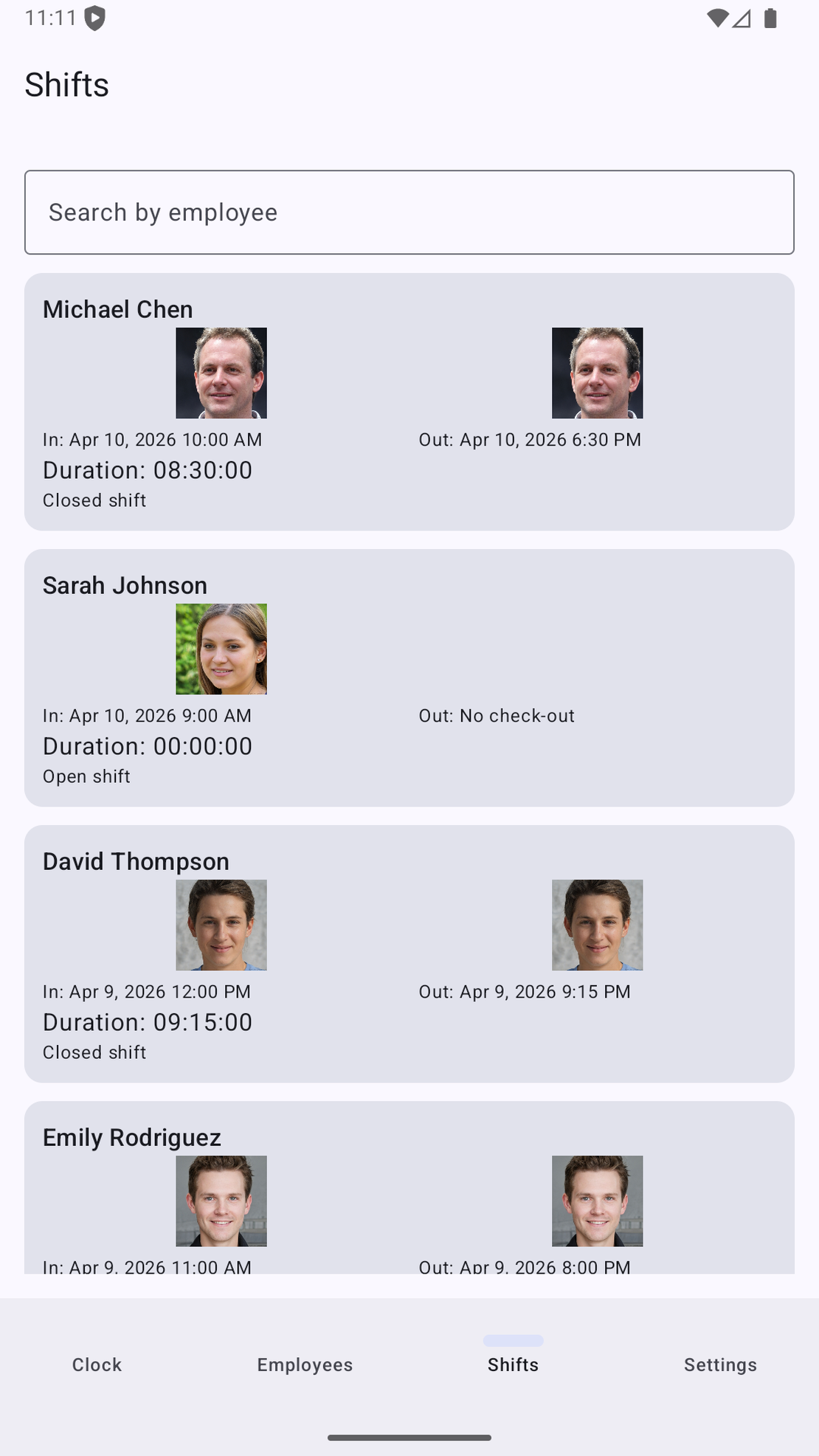
Mostly one reason: buddy punching. A PIN can be texted to a colleague. A card can be handed over. A face can’t be lent out, and every clock-in comes with a photo of whoever was standing there.
The other reasons are smaller but real:
- Nothing to lose or forget. No cards to replace, no PIN resets on a Monday morning.
- Nothing to touch. Fingerprint readers get greasy in kitchens and fail on flour, cement dust and dry winter skin. A camera doesn’t care.
- Nothing to wear out. A fingerprint sensor is a part that dies. A tablet camera will outlast the tablet.
What you give up compared to a PIN pad: face data is biometric data, and that comes with legal duties in some places. More on that below.
The three kinds of facial recognition time clock
1. Dedicated wall terminals
A box with a camera and a small screen, screwed to the wall, often with a card reader and fingerprint sensor built in. Brands like ZKTeco and Anviz sell lots of these.
- Good at: surviving. They’re built for a factory entrance. Many work offline and sync later.
- Weak at: everything around the hardware. Setup is often through a Windows program or a cloud portal. Replacing a broken one means ordering a specific model.
- Cost: the hardware is usually a one-off purchase in the low hundreds of dollars and up, sometimes plus a software subscription.
2. Cloud apps with a tablet “kiosk mode”
A time-and-attendance service - usually part of a bigger scheduling or payroll product - that turns a tablet into a clock-in station. The face matching typically happens on the vendor’s servers.
- Good at: the bigger picture. Multi-location dashboards, schedules, payroll integrations, notifications when someone’s late.
- Weak at: working without internet, and privacy. Face images or embeddings leave the building, so your staff’s biometric data now sits with a third party. If the Wi-Fi drops on a Saturday night, clock-ins may queue up or fail.
- Cost: a monthly subscription per user. Usually a few dollars per person per month, which adds up for a 20-person team over a few years.
3. On-device apps
An app that runs detection, encoding and matching entirely on the phone or tablet. Nothing is sent anywhere. FaceClock is one of these.
- Good at: privacy, cost, and working in places with bad or no internet - basements, market stalls, building sites, rural workshops.
- Weak at: anything that needs more than one device to talk to another. No central dashboard for five locations, no live alerts, no direct payroll sync. You export the hours and take them where they need to go.
- Cost: FaceClock is free. The only hardware is an Android device you might already have in a drawer.
Where face clocks fail (all of them)
I’d be suspicious of any vendor that doesn’t mention these.
Backlight. A camera facing a glass door at 8 a.m. sees a silhouette. This is the number one cause of “it doesn’t recognise me”. Mount the device with the light source behind the camera, not behind the person.
Big changes in appearance. A full beard grown over a month, or new thick-framed glasses, can push someone below the threshold. Re-enrolling takes a minute.
Twins and close siblings. Consumer-grade face recognition can struggle with identical twins. If you employ some, give them another way to clock in or check their shifts by photo.
Photos of faces. Holding up a photo of a colleague is the obvious attack. Expensive terminals add liveness detection - infrared or 3D sensors - to stop it. FaceClock doesn’t run a separate anti-spoofing model. What it does is keep a photo of every clock-in and clock-out, so a manager scrolling the shift log sees a phone screen held up to the camera immediately. For a 10-person cafe that’s usually enough of a deterrent. For a site with 300 contractors, you want hardware liveness.
The legal part, briefly
In the EU, face data used to identify people falls under GDPR Article 9. In Illinois, BIPA requires a signed written release before the first scan and lets employees sue for $1,000 to $5,000 per violation. Texas, Colorado and California have their own rules.
The single biggest factor is whether biometric data leaves the device. If it does, you have a vendor relationship, data transfers and a breach risk to explain. If it doesn’t, most of that goes away and what’s left is notice, consent and retention - all things you control. We wrote a longer breakdown here: biometric time clocks and the law.
Checklist before you pick one
Take this to any product page, including ours.
- Where does matching happen? On the device, or on a server? If the page doesn’t say, assume a server.
- Does it work with no internet? Not “caches for a while” - works, indefinitely.
- What does it store? Photos, embeddings, both? For how long? Is deletion automatic?
- Can staff clock in without their own phone? Asking a 19-year-old line cook to install an app to get paid causes friction you don’t need.
- What happens when it doesn’t recognise someone? Retry, fallback, manager override?
- Can a manager change clock-in times after the fact? Some owners want that. Others want the opposite, a log nobody can quietly edit. FaceClock is the second kind: a captured shift can’t be moved, only added to.
- How do the hours get to payroll? CSV, PDF, direct integration?
- What does it cost for your headcount over three years? Per-user pricing looks small until you multiply it.
- What happens to the data when you stop paying? With a cloud product, ask how you export it and how they delete it.
When FaceClock fits, and when it doesn’t
It fits one location with one entrance and somewhere between 3 and 50 people: a cafe, a salon, a dental practice, a workshop, a small warehouse, a school office. Set it up like this:
- An Android device running 7.0 or later - an old phone or a cheap tablet is fine.
- Mount it at the entrance at face height, with light falling on faces rather than behind them. Turn on keep-screen-on in Settings and plug it in.
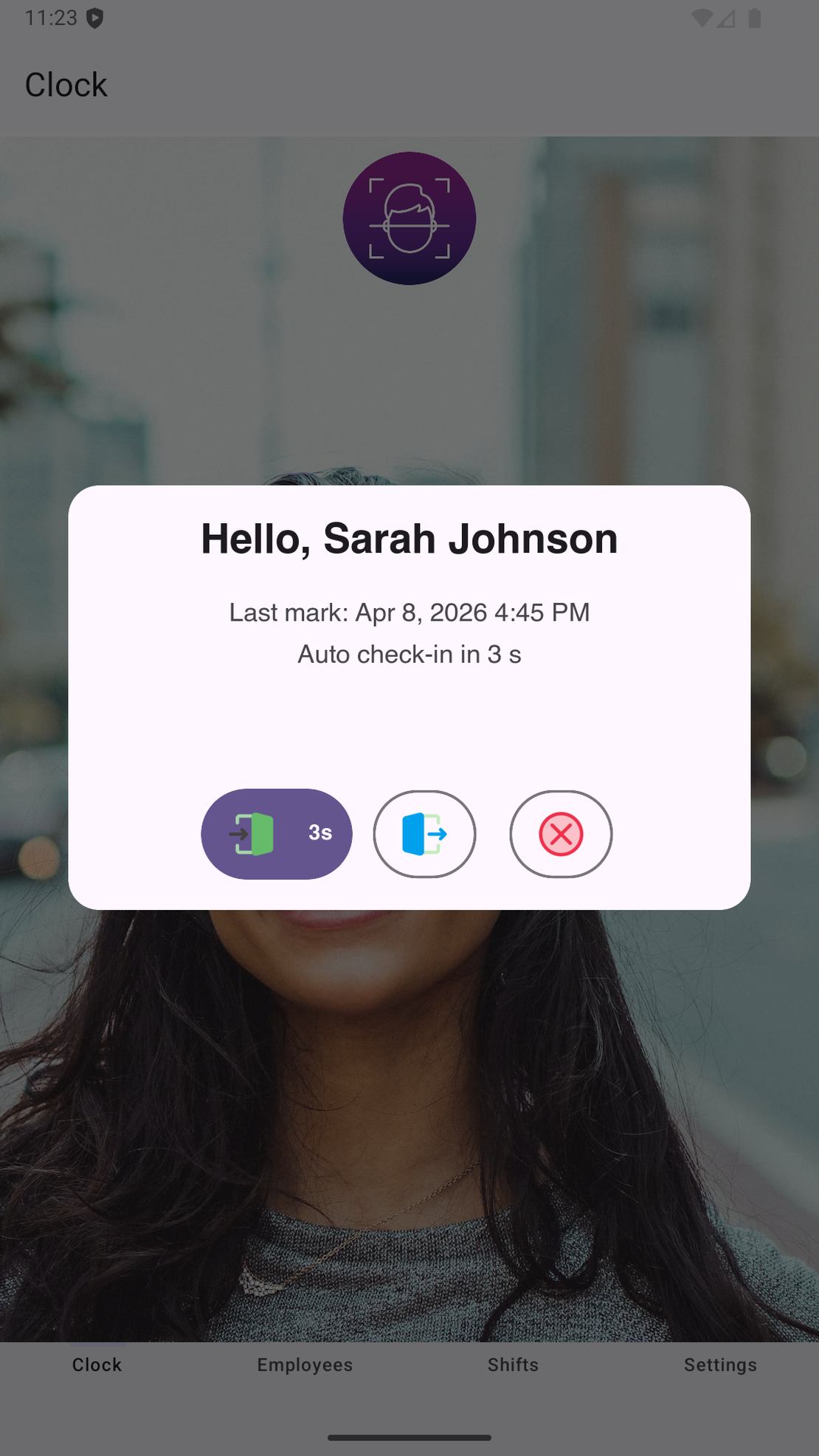
- Nobody pre-registers anyone. The first time an unknown face taps the button, the app asks for a name and takes one reference photo. From then on that person just taps and looks.
- Shifts crossing midnight are stored as one record. If someone forgets to clock out, the next clock-in after the maximum shift length (12 hours by default) starts a new shift.
- Export a CSV or a PDF with the clock-in photos when payroll is due. Shift data is kept for 90 days and then deleted automatically, so export at least monthly.
It doesn’t fit if you need several sites reporting into one dashboard, hardware liveness detection, direct payroll integration, or an app interface in a language other than English or Russian. For those, look at the cloud products and the terminals above, and use the checklist to compare them.
If you want to see how the rest of the setup works day to day, time tracking for cafes and restaurants walks through a 12-person coffee shop end to end.